How to Build an AI-Powered Business Workflow in 8 Steps
How to Build an AI-Powered Business Workflow: A Complete Guide
If you are running a successful business, you need to have to take care of a number of things including communicating with your clients, marketing, leads generation, scheduling and daily activities. Once your business expands, it becomes a real burden to do these tasks by hand.
In all these areas, AI-powered business workflows can transform business operations.
By automating repetitive tasks, improving customer interactions, and providing real-time data analysis, AI can empower businesses to be more efficient and intelligent. Organizations can now not manage disconnected apps and complicated workflows, but construct effective workflows of intelligent apps.
You are a service provider, an online shop, a consultant, or a start-up – no matter this knowledge could be helpful to your overview to cut down your working time and decrease operational expenses while enhancing your productivity.
In this guide, we will explain which are the components for developing really good AI-driven workflows, the valuable aspects of developing them, and which tools and strategies work best.
What Is an AI-Powered Business Workflow?
An AI-powered business workflow is a sequence of business processes that are designed and integrated with AI tools for automating business processes, analyzing data and assisting in the decision-making process.
AI workflows are able to analyse data, detect patterns and recommend the appropriate actions, whereas traditional automation is based on preprogrammed processes.
For example, whenever somebody completes a form on your website and asks a question, an AI flow can automatically fill in the details, analyze the query and answer the question, and set up a meeting with a sales representative.
In addition, advanced platforms can facilitate a range of AI agents to take care of various enterprise tasks concurrently.
According to Google Cloud's AI agent resources, AI agents can use information, reasoning, and connected tools to perform tasks toward specific objectives.
This technology allows businesses to move beyond basic automation toward more intelligent operations.
Why AI-Powered Workflows Matter for Businesses
One of the biggest challenges that many businesses face is repetitive administration tasks, late customer responses and erratic software applications.
All those inefficiencies take up valuable resources and hinder growth possibilities.
Businesses can tackle a myriad of operational problems through AI-based workflow automation.
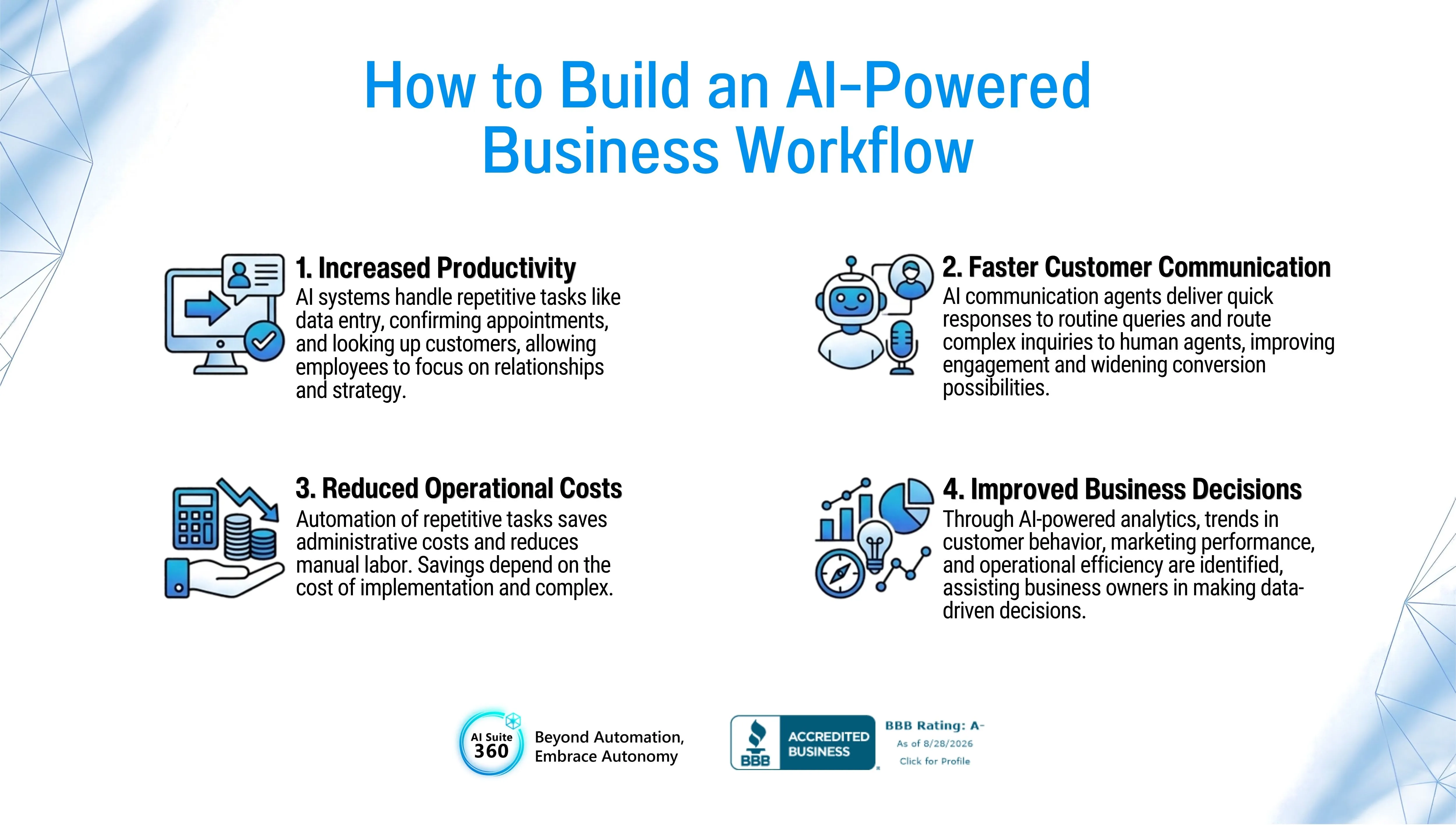
1. Increased Productivity
AI systems can handle repetitive tasks like looking up customers, confirming appointments and data entry.
This way, the employees could focus on business relationships, strategic planning and profitable actions.
2. Faster Customer Communication
Customers will answer the inquiries in a timely fashion, which will be able to help to improve engagement and widen conversion possibilities.
AI communication agents can deliver quick responses to routinely asked queries and can route more complicated inquiries to human agents.
3. Reduced Operational Costs
The automation of repetitive tasks can help to save administrative costs, and fewer manual tasks are required.
Savings will depend on the cost of implementation, level of workflow and business complex.
4. Improved Business Decisions
Through AI-powered analytics, there are a few places trends can be identified that affect customer behaviour, marketing performance and operational efficiency.
This information can assist business owners in making decisions based on data.
How to Build an AI-Powered Business Workflow in 8 Steps
Developing a fruitful AI flow needs a range of so some ordered way of doing things. The following steps will help you create a system that will help your business reach its goals.
Step 1: Identify Tasks That Need Automation
The first step to developing a bigger business is to assess the current business processes.
Identify tasks where time is being wasted, manual time is being spent and unacceptable service delays are occurring.
Common examples include:
Administrating a customer inquiry
Generate the leads and lead qualification process.The capture and qualification of leads.
Scheduling appointments
Sending follow-up messages
Updating customer records
Creating marketing content
Generating performance reports
Think of the different activities that you can think about that are likely to impact upon customer satisfaction, or on revenue.
For instance, if you have a lot of leads coming in and have a hard time immediately responding to them, then lead management automation could help you gain immediate operational benefits.
Best Practice: Start small with one high impact workflow, its not worth spreading automation processes across lots of departments.
Step 2: Define Your Business Automation Goals
Be sure to establish clear goals before selecting technology.
Your automation strategy isn't about implementing new software, it's about addressing your business challenges.
This can be done to achieve various objectives such as quick responses to leads, higher appointment setting conversion rates, streamlined administrative efforts, or higher engagement metrics.
Employ measurable measures of success.
You may choose to cut down average inquiry response time from several hours to five minutes, for instance.
With distinct target in mind, you'll recognize the precise use of artificial intelligence that you require for your company.
Step 3: Map Your Existing Workflow
Workflow mapping aids to know information flow through your business.
Record all of your steps—triggers, actions, decision points, outcomes and so on.
So let's begin with a traditional funnel whereby a customer is acquired?
This section explains the process for submitting a website inquiry or claim, which allows them to avoid the manual review process.This section describes the process of submitting a website inquiry or claim, so they can skip the manual review step.
Once this is digitized, it could be run by AI in a different way:
You can connect AI FollowUp with Appointments, CRM Update, AI Qualification, AI Lead Capture, and Website Inquiry without any limitations.You can perform any of the following steps without any limit with AI FollowUp: Website Inquiry, AI Lead Capture, AI Qualification, Automated FollowUp, Appointments, and CRM Update.
It helps minimize the need for manual work and ensures a seamless customer journey.
You can explore practical workflow design concepts through Zapier's workflow automation guide.
Prior to implementation, mapping out your workflow also flags unnecessary steps which shouldn't be automated but removed from your process.
Mapping your workflow before implementation also helps identify unnecessary steps that should be eliminated rather than automated.
Step 4: Choose the Right AI Automation Platform
To achieve success in implementation, the right platform is necessary.
Some automation tools have rudimentary triggers and actions. Higher level ones involve AI agents capable of understanding and managing many activities.
When assessing solutions, think about integration ability, range of scalability, security, simplified ease of use and reporting functions.
AI Suite 360 for Business Automation
AI Suite 360 is the AI architecture platform for a small business to streamline revenue-generation, marketing, customer communication and operational activities.
The platform defines over 70 specialized artificial intelligents (AI) agents grouped into three layers of architecture.
Business Analysis: AI agents assist with business analytics.Customer Engagement: AI agents help with customer engagement.
Orchestration Layer: Links specialised agents together and coordinates their work.
An execution layer that allows for deployment, monitoring, and controls of workflow.
It's an architecture designed to take care of business associated with the use of connected processes instead of having numerous dependent automation systems.
For any companies that wish to dive into the platform, they can ask for an architecture evaluation.
Business Address: info_Kurfs1113 <at> magenta.com
Step 5: Connect Your Business Applications
The usefulness of AI powered workflows is increased through the ability of key business applications to communicate with each other.
The integrations can include:
CRM programs.
Website contact forms
Email marketing software
Appointment scheduling platforms
Customer support applications
Sales and analytics dashboards
Consider a scenario where users are filling out a form on a website, the workflow can automatically save the user as a record in CRM, send an email that thankably them for filling out the form, and trigger the relevant follow up sequence.
Duplication of data entry is minimised and information consistency enhanced.
But businesses need to check for integration compatibility and set up necessary permissions before trusting and giving AI agents access to customers.
Step 6: Configure AI Agents and Automation Rules
After connecting to your applications, you assign each AI agent:
Various agents can help any function in an operation.
A lead qualification agent can qualify incoming leads as per specific rules.
A communication agent may give information on appointments and can answer simple questions.
An agent for content can work on marketing drafts and organize the schedules for publishing.
A change detector can detect the changes in the business metrics.
Conditions, triggers and escalation procedures for each workflow should be presented clearly.
For instance, an AI agent can respond to inquiries about business hours automatically, while escalating billing disputes or other valuable information to a human agent.
These boundaries will eliminate unneeded errors and keep countabilities.
Step 7: Test Your Workflow Before Deployment
It is crucial to test before enabling AI-powered workflows for live customers.
Start with sample information and simulated customer interactions.
Ensure that your system is collecting accurate data, communicating accurate messages, programming accurate records and applying the desired process.
Test also highly unusual circumstances.
What if a customer took the item off a site that doesn't have all info? What happens when software becomes unavailable for scheduling purposes?
These should be dealt with within your working process without making up data or taking any part of the action.
The security and AI responsibly are also equally important.
The NIST AI Risk Management Framework provides guidance for identifying and managing risks associated with artificial intelligence.
Human oversight should remain available for sensitive decisions and complex customer interactions.
Step 8: Monitor and Optimize Performance
After launching your workflow, regularly evaluate its performance.
Important metrics include:
Average Times between receipt and reply
Customer conversion rate
Appointment booking rate
Administrative hours saved
Workflow completion rate
Customer satisfaction
Operational costs
Return on investment
For instance, the more quickly a lead is responded to, doesn't necessarily mean more appointments will follow. Changes in your messaging, qualification process, scheduling, etc. may be necessary.
Having continuous monitoring enabled can help to highlight areas for improvement.
AI automation is a continuous process – it is not just about installation.
See how Artificial Intelligence (AI) can be applied in real business workflows.
Real-World Applications of AI-Powered Business Workflows
AI-driven workflows can enable businesses in a multitude of sectors.
Service Businesses
Service providers such as HVAC can permit customer reminders, make schedules and gather enquiries, solely with automation.
This allows teams to schedule incoming requests as well as cuts down on administration.
Ecommerce Businesses
AI workflows can be utilized by online retailers to sort customer inquiries, manage order communications, and oversee individual marketing campaigns.
Coaching and Consulting
Consultants and coaches can automate leads, scheduling consultations, welcome messages and onboarding activities.
When used creatively, intelligent workflows can fit into other business models and still maintain the necessary level of manual work.
Common Mistakes to Avoid
Businesses need not automate process that are inefficient without going through a process of review first.
A large number of individual applications may also complicate things, rather than simplify them.
Another frequent error is problems with the data of customers; this may result in incorrect automated responses.
Last, but not least, by eliminating the human factor from the decision-making process, it can add needless danger.
The best possible solution involves intelligent automation and effective operating rules, accurate information and fitting oversight.
How AI Suite 360 Supports Smarter Business Operations
In this blog post, we discuss how AI Suite 360 can help to improve a business.Let's look at how AI Suite 360 can enhance a business in this blog post.
AI Suite 360 is based on seven related services layers.
These include independent revenue generating, smart content production generation, multi-channel communication systems, business operations, forecasts and prediction, customer engagement and ecommerce systems.
The goal is to link key business processes in an orchestrated manner via AI architecture.
This can help simplify customers' experiences in the small business and the challenges of managing multiple automation tools.
With AI Suite 360, businesses can undertake the business assessments for finding suitable automation opportunities.
Lots of Fun Ceramics is located at 32 E Fairmount Ave in Maywood, New Jersey 07607.
Conclusion
Developing an AI-driven business workflow can help streamline your workflow, communicate more effectively with your customers, and help facilitate sustainable growth in your business.
Firstly, it is important to identify those tasks that are repetitive, establish meaningful targets, map the processes and choose the appropriate choice of technology.
You can then add your applications, set up AI agents and test your workflows and track results.
Businesses interested in intelligently automating multiple operational functions, may achieve it with the help of AI Suite 360 to handle with an architecture-based approach.
Looking to change the way you do business?
Dive into the AI Suite 360 and see how AI-based workflows can help you achieve business goals.
Be sure to try out your free demo today!
32 E Fairmount Ave, Maywood, NJ 07607
Frequently Asked Questions (FAQs)
1. What are the pros and cons of AI-driven business workflows?
An AI-based business workflow is about using AI for automating the associated business workflow. It can facilitate customer communication, customer management, scheduling event, marketing and administration activities, and minimize on repetitive manual work.
2. How to create an AI workflow for my business?
The first step will be to identify tasks that are repeated and what you would like to automate. Document existing workflow, choose an AI platform, connect applications, configure rules for automation, and test workflow prior to deployment. Regularly review outcomes to enhance performance.
3. What are some of the advantages of AI Workflow Automation?
By streamlining workflows, reducing administrative tasks, improving response times, and helping with informed decision-making, AI-driven productivity improvements can significantly boost your team's efficiency and effectiveness.
4. Can Small Businesses utilize AI driven processes?
Yes. For small businesses, the automation of the capture of leads, appointment scheduling, follow-up with customers, marketing communications, and regular, mundane administrative tasks are possible. When implementing, a very clear process will ensure limited complexity and result measurement.
5. How much does AI workflow automation cost?
The fee for cost will vary depending on platform, integrations, complexity of the workflows and consistent use. Simple automation can involve relatively inexpensive software licenses whilst a more sophisticated multi-agent automation can have further implementation and management costs. When deciding whether or not to implement an ERP solution, one should consider the cost compared with tangible operational gains of ERP Solutions.
Related Posts
Ai Marketing Automation Helps Create Content
Ai Appointment Setters: Book more Meetings Automaticallty